

YouTube · paste a link
How to import a YouTube video or comments by pasting the URL
Direct answer
Yes. Open the video or Short on YouTube, copy the full URL from the browser address bar, paste it into Provoon Import under YouTube, then pick one of two options: Video (bring the clip into your library) or Import comments (fetch comments and Add the ones you want). Nothing goes public until you approve it and place it on your Wall of Fame.
Why paste a YouTube URL
YouTube already holds product demos, launches, and buyer comments under the video. Screenshotting comments into Canva is slow. Provoon takes the same youtube.com/watch or /shorts/ link you have open and gives you two clear paths: import the video itself, or pull comments and Add only the quotes worth showing next to pricing or a Wall of Fame.
How to import YouTube into Provoon
- 1
Copy the YouTube or Shorts URL
Open the video or Short in a browser. Select the full URL in the address bar and copy it. A good link looks like youtube.com/watch?v=... or youtube.com/shorts/... - not a channel page or a search results URL.
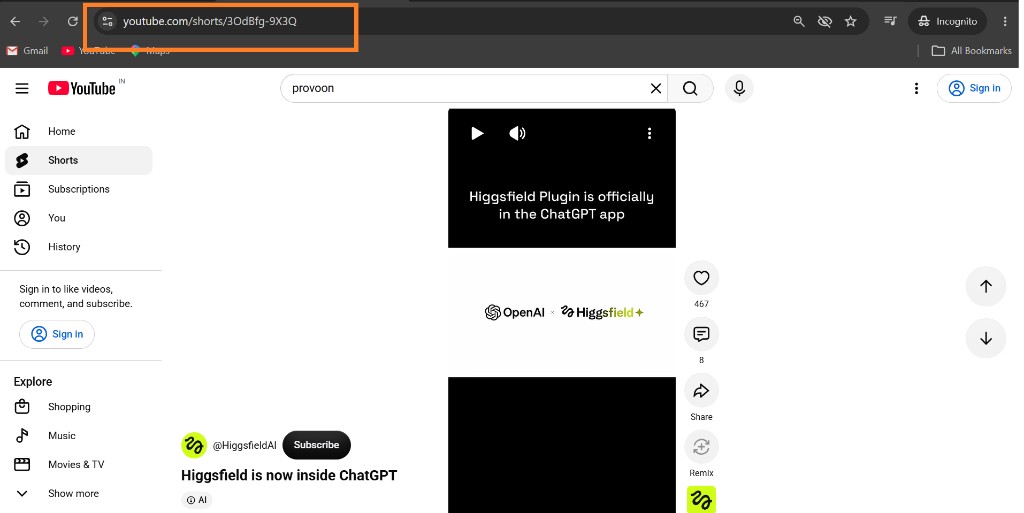
YouTube Shorts page with the browser address bar highlighted so you can copy the video URL - 2
Paste it and choose Video or Import comments
In your wall, open Import, choose YouTube, stay on Import from URL, and paste into YouTube URL. Then pick one option: Video adds the clip to your stories (uses one video on your plan). Import comments fetches comments under that URL - Business plan gets up to 100 per page. Click Preview video or Get comments depending on your choice.
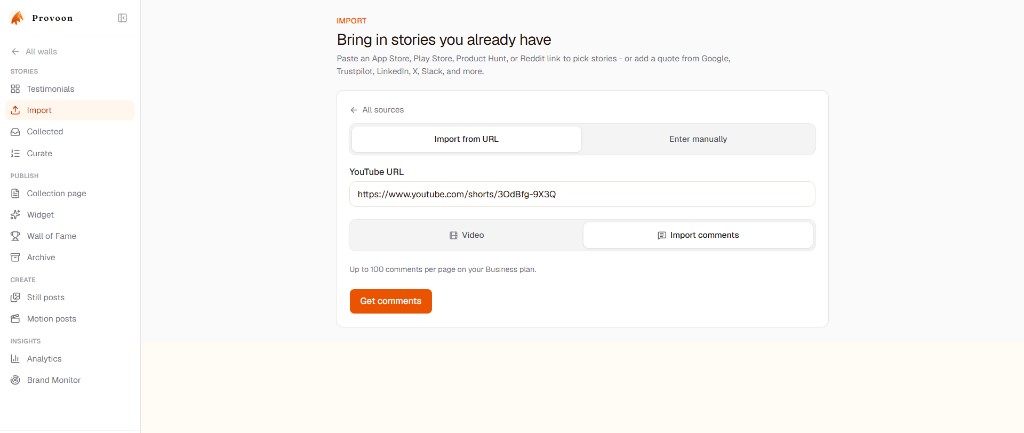
Provoon Import screen with a YouTube Shorts URL pasted and Video vs Import comments options - 3
Click Add on what you want to keep
For Video, preview the clip then Add it. For Import comments, scan the list and click Add on specific, useful lines - skip empty reactions. You can switch options and fetch again with the same URL.
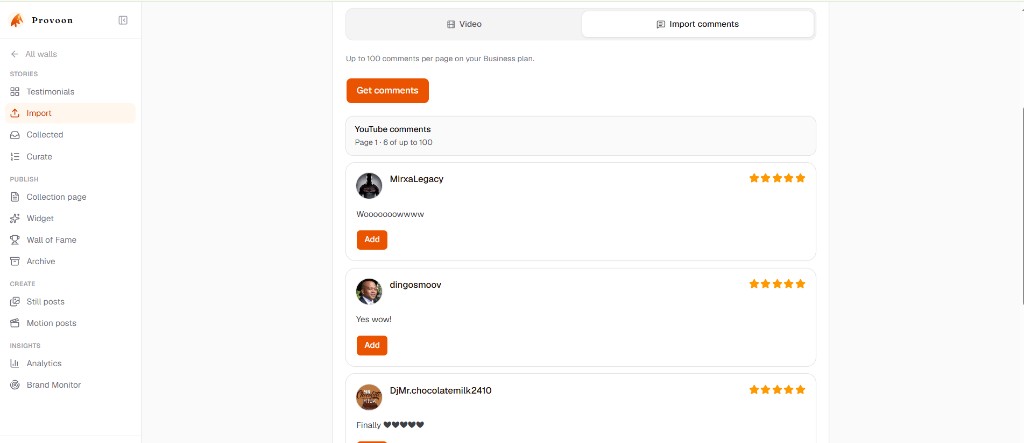
List of YouTube comments in Provoon with Add buttons on each comment card - 4
Approve and show it on your Wall of Fame
Open Collected if the story needs approval, then include it in Curate / Wall of Fame or an on-site widget. Imports and fresh collection submissions share one inbox, so YouTube clips and comments can sit next to X, Reddit, or Google reviews.
What gets saved from YouTube
Video mode stores the video as a story with the YouTube URL as source. Comments mode stores author name, comment text, date when available, a YouTube source badge, and the video URL as the linked source. Edit carefully without changing meaning. Only republish content you have the right to show.
Practical tips
- You have two options on the Import screen: Video (the clip) or Import comments (replies under it).
- Shorts and regular watch URLs both work - copy from the address bar on the open video.
- Prefer comments that name outcomes over one-word reactions when building social proof.
- Nothing auto-publishes. Add, approve, then place proof near decisions (pricing, booking, CTA).
- If consent or visibility feels unclear for a comment, leave it out or ask again with a Provoon collection link.
FAQ
What are the two YouTube import options?
Video brings the YouTube clip into your Provoon library as a video story. Import comments fetches comments on that URL so you can Add only the ones you want. Pick one path per fetch - you can run the other later with the same link.
Do I need a YouTube API key?
No. Paste a public YouTube or Shorts URL. Provoon does not ask you to create a Google Cloud project.
Do Shorts work the same as regular videos?
Yes. Copy youtube.com/shorts/... from the address bar the same way you copy a watch URL, then choose Video or Import comments.
Do imported YouTube items publish automatically?
No. Click Add, then approve and place them on your Wall of Fame like any other story.
Will new comments sync by themselves later?
Treat import as a curated pull, not a live mirror. When you want fresh comments, paste the same URL, choose Import comments, and Add again.
Keep going
Have the Maps link ready? Paste it in Provoon, Add the reviews you want, and publish the wall.