

TripAdvisor · paste a link
How to import TripAdvisor reviews by pasting the listing URL
Direct answer
Yes. Open your listing on TripAdvisor, copy the full review page URL from the browser address bar (Hotel_Review, Restaurant_Review, Attraction_Review, and regional sites like tripadvisor.in are fine), paste it into Provoon Import under TripAdvisor, and click Get TripAdvisor reviews. Click Add on each review you want - nothing goes public until you approve it and place it on your Wall of Fame or embed.
Why paste the TripAdvisor listing URL
Travelers already leave stay and visit notes on TripAdvisor that bookers trust. Screenshotting bubbles into a brochure is slow. Provoon takes the same Hotel_Review / Restaurant_Review / Attraction_Review link you see in the address bar, loads matching reviews, and lets you Add only the quotes worth showing next to booking CTAs or a Wall of Fame. You stay in control. No dumping every short line onto the homepage by accident.
How to import TripAdvisor reviews into Provoon
- 1
Copy the TripAdvisor listing URL from the address bar
Search your property or place on TripAdvisor and open the correct listing (check name, city, and score). Select the full URL in the browser address bar and copy it. A good link looks like tripadvisor.com/Hotel_Review-g...-d...-Reviews-Name-City.html (or tripadvisor.in / other regional hosts) - not a search results page.
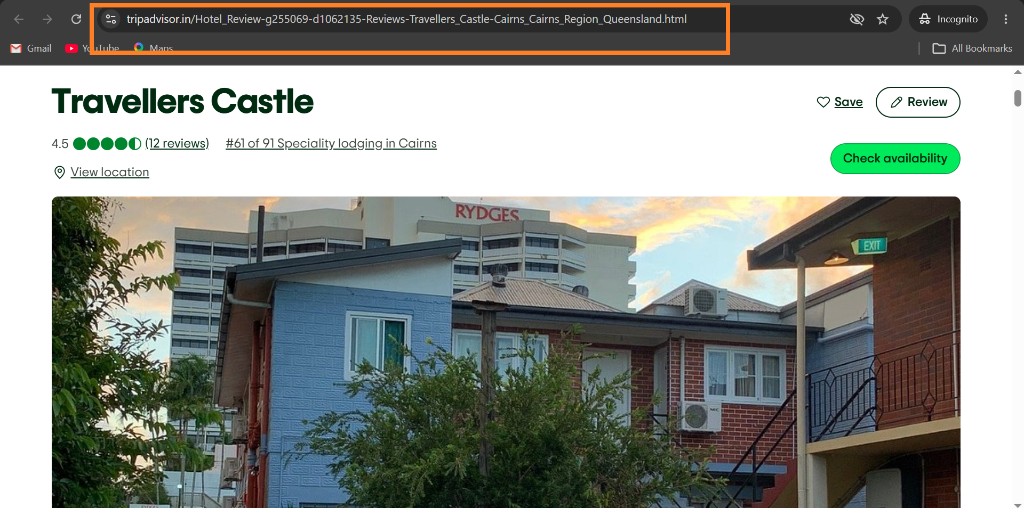
TripAdvisor hotel listing with the browser address bar highlighted so you can copy the Hotel_Review URL - 2
Paste it in Provoon Import and get the reviews
In your wall, open Import, choose TripAdvisor, stay on Import from URL, and paste into the TripAdvisor URL field. Click Get TripAdvisor reviews. Provoon saves that URL on each imported story as the personal / social link so visitors can still verify the source.
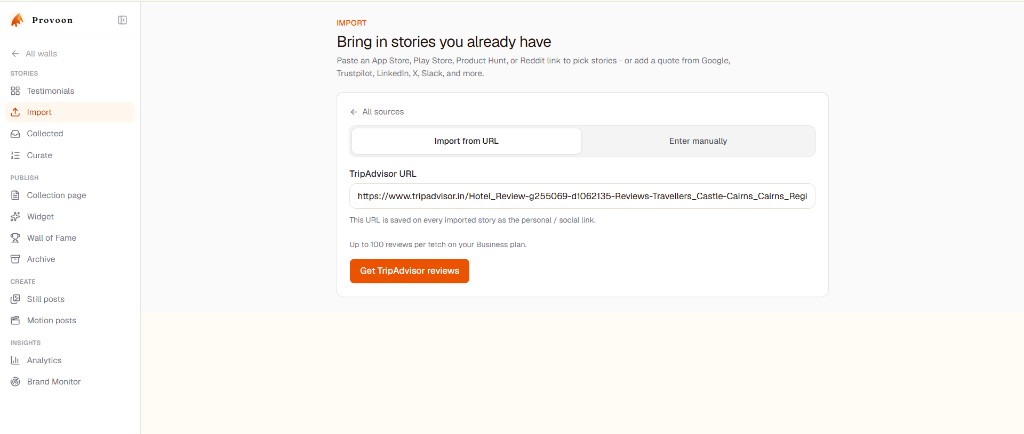
Provoon Import screen with TripAdvisor URL pasted and Get TripAdvisor reviews button ready - 3
Click Add on each review you want
Provoon lists the fetched reviews with stars, date, title, and quote when available. Click Add on the ones that help bookers - skip vague one-liners or complaints you do not want on-site. Selective Add beats importing everything and cleaning up after.
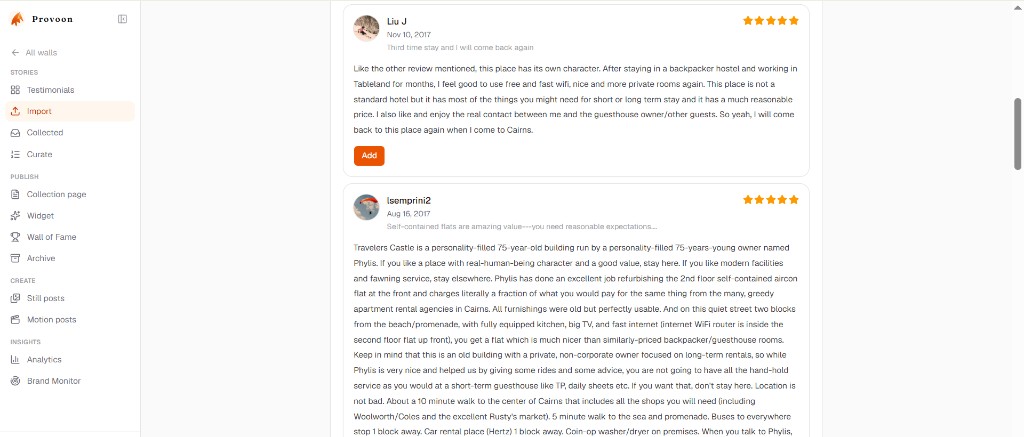
List of TripAdvisor reviews in Provoon with the Add button on review cards - 4
Approve and show it on your Wall of Fame
Open Collected if the story needs approval, then include it in Curate / Wall of Fame or an on-site widget. Imports and fresh collection submissions share one inbox, so TripAdvisor quotes can sit next to Booking.com, Google, or video you recorded in Provoon.
What gets saved from each TripAdvisor review
Each Add stores the reviewer name, star rating, review title and text when available, date when available, a TripAdvisor source badge, and the listing URL as the linked source. Edit typos carefully without changing meaning. Only republish reviews you have the right to show.
Practical tips
- Prefer the full Hotel_Review / Restaurant_Review / Attraction_Review URL from the address bar over a city search or homepage link.
- Regional hosts (tripadvisor.in, tripadvisor.co.uk, etc.) are fine - copy the listing you actually manage.
- Confirm the listing before you copy - similar names in different cities will pull the wrong reviews.
- Business plan fetches up to 100 reviews per run; start with specific stay notes, not every short line.
- Nothing auto-publishes. Add, approve, then place proof near booking CTAs or room pages.
- If TripAdvisor terms or consent feel unclear for a specific quote, leave it out or ask again with a Provoon collection link.
FAQ
Do I need a TripAdvisor Content API key?
No. Paste the public listing URL. Provoon does not ask you to register a TripAdvisor developer app for this import.
What TripAdvisor URL should I copy?
Open the hotel, restaurant, or attraction page and copy the full URL from the browser address bar - typically a link that includes Hotel_Review, Restaurant_Review, or Attraction_Review. Avoid search results pages.
Do tripadvisor.in or other country sites work?
Yes. Copy the listing URL from whichever regional TripAdvisor host you use. The important part is the review listing path, not only .com.
Do imported TripAdvisor reviews publish automatically?
No. Click Add on the reviews you want, then approve and place them on your Wall of Fame or embed like any other story.
Will new TripAdvisor reviews sync by themselves later?
Treat import as a curated pull, not a live mirror. When you want fresh quotes, paste the same listing URL again and Add the new ones.
Can I mix TripAdvisor with Booking.com or Google Maps?
Yes. Imports and new collection submissions live in the same workspace and can feed the same wall, nudge, or social export.
Keep going
Have the Maps link ready? Paste it in Provoon, Add the reviews you want, and publish the wall.